
29 Jul, 2026
The browser has three built-in AI APIs now: Prompt (LanguageModel), Summarizer, and Translator. They run a model on your machine. Nothing leaves the page.
I shipped two of them on this site — the summarize and translate controls at the top of every post — and the interesting findings were not about what the models can do. They were about how these APIs fail.
What your browser can do
Compatibility tables go stale, and they cannot tell you about your browser. This is a live probe:
Your browser, right now
Checking…
If that says “Not in this browser” three times, you are likely on Firefox or Safari, and that is the common case today. Nothing below requires you to have it.
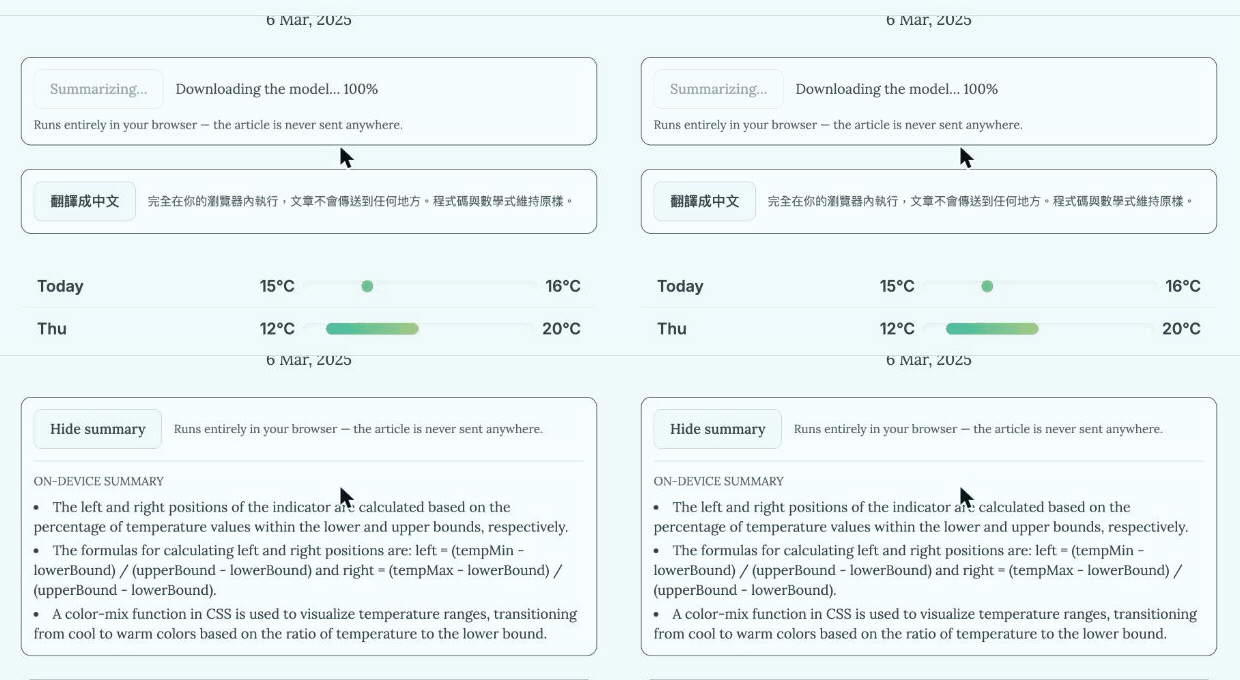
Here is what the summarize control actually does, recorded on this site in Chrome 150 — so the feature is legible whether or not your browser can run it:
The landscape is stranger than “Chrome has it”
Measured 2026-07-29:
| Chrome 150 | Edge 150 | |
|---|---|---|
LanguageModel (Prompt) | present | absent |
Summarizer | present | present |
Translator | present | present |
Both are Chromium 150. Same engine version, different API surface. Any mental model that says “Chromium 150 supports X” is wrong.
The practical consequence: a feature built on Summarizer or Translator reaches strictly more people than one built on the Prompt API. The less glamorous APIs have the wider reach. That inverted the plan I started with.
It also rules out version sniffing. navigator.userAgent cannot answer this question. Only feature detection can, and it has to be per-feature — three separate probes, three separate answers.
Present is not the same as working, so I checked
“Present” is a weak claim, so both features were driven end to end in each browser against the live site. Both work in both — and Edge is markedly slower:
| Chrome 150 | Edge 150 | |
|---|---|---|
| Summarize a post | 5–13s | 24.8s |
| Translate a post to 中文 | 3.9s | 36.5s (incl. first download) |
The outputs differ in wording, not just timing. Asked for the same three key points, Chrome returned “The left and right positions of the indicator are calculated based on…” where Edge returned “Calculate indicator left and right positions using…”. Different models behind the same API — which is itself the useful signal that something real is running, and the reason the stub in the next section was so hard to spot.
Three failures that do not look like failures
This is the part worth your attention. Each of these cost real debugging time, and none of them throws.
1. The API that answers, successfully, with nothing
One Chromium build I tested has the full Summarizer surface. availability() reports states. create() resolves. summarize() resolves. Here is what it returns:
input:  "Bananas are yellow. Bananas grow in bunches. Bananas are a fruit."

output: "Model not available in Chromium
         Bananas are yellow. Bananas grow in bunches. Bananas are a fruit."
A canned string, then your input echoed back. No error, no rejected promise. Every capability check I had written reported ready, and every call succeeded.
You cannot feature-detect your way out of this. A capability ladder — does the global exist, is the model available, does a real call succeed — passes all three rungs here. The only signal is the content of the output, which is precisely the thing you cannot validate in general.
I do not have a fix for it. I have a warning: a working API surface is not evidence that a model is behind it.
2. The probe that never answers
availability() reads like a cheap lookup. Usually it is:
await LanguageModel.availability(); // → "downloadable"  (0ms)
await Summarizer.availability(opts); // → "downloadable"  (0ms)
await Translator.availability(pair); // → never resolves
Same page, same moment. The third simply never settles.
A hung probe is worse than a failing one, because nothing downstream can distinguish “still checking” from “will never answer”. Two things broke on it:
- a component that gates its own render on the result stays invisible forever, with nothing logged
- a
Promise.allacross several probes is held hostage by the slowest
Both were real, and the second is how I found the first. Had each feature probed alone, I would have shipped a control that silently never appears on some browsers.
The fix is unexciting and mandatory:
const withProbeTimeout = (probe, fallback) =>
  Promise.race([
    probe,
    new Promise((resolve) => setTimeout(() => resolve(fallback), 5000)),
  ]);
A probe that does not answer is a no.
3. The catch that hides three different bugs
I wrapped an AI call in try/catch and, on failure, showed nothing — reasoning that a failed enhancement should never break the page underneath it.
The reasoning is right. The implementation was not. Three separate defects all rendered as the same silent nothing:
- a session that was never opened
- an argument the tool layer correctly rejected
- a run that hit its timeout
Two survived a full review, because from the outside they were indistinguishable from “the model had nothing to say”. They surfaced only when I drove the feature by hand in a real browser.
Degrading can be silent. Failing cannot.
Latency, and the surprise underneath it
Early measurements of a constrained call looked bimodal — roughly 0.6–2.4s, or 20–21s, with nothing in between. That is not a distribution of inference cost. It is two different amounts of work.
The cause was in my own schema. One field declared as an unconstrained string:
const SELECTION_SCHEMA = {
  type: 'object',
  properties: {
    tool: { type: 'string', enum: toolNames },
    query: { type: 'string' }, // ← the problem
  },
};
The model treated it as room to answer the question itself: 2,805 characters of prose, including a confidently hallucinated list of projects, taking 39 seconds to generate.
Constraining the same field to a single token:
query: { type: 'string', pattern: '^[A-Za-z0-9.#+-]{1,24}$' },| schema | latency | value produced |
|---|---|---|
| unconstrained | 39.1s | 2,805 chars of prose |
maxLength: 30 | 1.3s | truncated prose |
| single-token pattern | 0.9–1.7s | "script", "Vue.js" |
Constraining the output shape was worth more than any timeout tuning. I had already spent time raising a timeout to accommodate the slow mode before realising the slow mode was self-inflicted.
With constrained decoding, your schema is a performance interface, not only a validation one. Every unconstrained string is an invitation.
Downloads are not inference
A related mistake, found only by testing on a browser with an empty model cache.
I bounded the whole operation with one timer, reasoning that a download is the part most likely to hang. Backwards. A few-hundred-megabyte download is the part most likely to be slow and perfectly fine. On a cold browser it was still at 74% when the inference budget expired, so a run that was working reported “took too long”.
Two phases, two budgets: a generous ceiling for opening the session, a tight one for the call.
The first bug needed a cold browser to find. The second — that create() accepts no AbortSignal, so a stalled download ignores your controller entirely — needed only a test. I would never have written that test without the first.
The architecture that makes this safe
The most valuable thing I built was not a feature. It is a rule about where facts come from.
The command palette on this site takes a question. A model reads it and picks a tool. Then:
- the model chooses which tool runs, and with what arguments
- the code runs it and writes the sentence, from the real result
The model never writes the answer. Why that matters, from a real run: asked which projects use Vue, the model produced a tidy hallucination naming Shopify, Discord, Vercel and Grafana as Vue projects. The reader saw:
vue appears in 0 projects.
Which is true. The prose was discarded because it was never in the output path — the sentence is composed from the query result, and the model’s free-text field was not among that tool’s parameters.
An on-device model in 2026 is a small model. It will be confidently wrong. Design so that being wrong costs you a wrong tool choice, never a wrong fact.
What I would build today
- Summarizer and Translator before the Prompt API. Wider reach, narrower task, far less room to hallucinate.
- Feature-detect per capability and per configuration. Availability is answered per option bag and per language pair; a bare probe can report ready about something you never asked for.
- Never let a probe or a download hang. Bound both, separately.
- Say when it failed. Silent degradation for the unsupported case; explicit failure for the broken one.
- Keep facts out of the model. Let it route; let your code answer.
The other on-device path: WebGPU
The built-in APIs are not the only option. WebGPU has been here longer, and libraries like WebLLM run larger models against it.
| Architecture | Description | Device | Vendor |
|---|---|---|---|
import { CreateMLCEngine } from '@mlc-ai/web-llm';

const engine = await CreateMLCEngine(selectedModel, {
  initProgressCallback: ({ progress }) => {
    console.log(`Initialization progress: ${(progress * 100).toFixed()}%`);
  },
});

const chunks = await engine.chat.completions.create({
  messages: [{ role: 'user', content: message.value }],
  stream: true,
});

reply.value = '';
for await (const chunk of chunks) {
  reply.value += chunk.choices[0].delta.content || '';
}
It is the same trade moved along a dial: WebLLM gives you model choice and reach through WebGPU, and charges a download measured in gigabytes rather than hundreds of megabytes. The built-in APIs give you a model that is already there — on the browsers that have one.
References
- The Prompt API — Chrome for Developers
- Get started with built-in AI — Chrome for Developers
- Prompt API on Edge — Microsoft
- Prompt API proposal — WICG
Measurements here are firsthand, taken 2026-07-29 on macOS against Chrome 150, Edge 150 and Chromium 150, while building the summarize and translate controls on this site.